Tuesday, May 28, 2013

Arduino Readings Diagram

This is a rough layout of the code so far of the arduino readings that it'll take. It's easier for the consumer to understand in a block diagram rather than the raw code itself.


Wednesday, May 8, 2013

To Scrap the App or Not To Scrap the App? - WORKING WITH BLUETOOTH

As the weeks wind down, the team is deciding whether they should ditch the mobile application for android or continue working on it. It is currently week 6 out of 10 and so far our programmers have only set up the environment for the application. Unless 24/7 effort is put for the application, it will most likely not be complete.

Hence, one of the members is working with bluetooth via laptop connection to work with the arduino and pulse band for now as an alternative.

Figure 1: Interfacing bluetooth module with Arduino
On the official Arduino's website, there are tutorials that help our project succeed:

One of the items required was a bluetooth modem along with the code required.
Figure 2: Bluetooth modem that will be connected with the Arduino

Draft of Prototype Pulse Band

Figure 1: Draft of the final product

Tuesday, April 23, 2013

Introduction to Biosignals

Biosignal is a term that summarizes all kinds of signals that can be (continually) measured and monitored from biological design.  The term biosignal is often used to mean bio-electrical signal but in fact, biosignal refers to both electrical and non-electrical signals.

They are usually taken to be (changes in) electric currents produced by the sum of electric potential differences across a specialized tissue, organ or cell system like the nervous system.

In the pulse band project, the team will mostly work with EKG/ECG - Electrocardiogram to measure heart rate via the pulse sensor. Also, Galvanic Skin Response is important to detect the sweating produced by hypoglycemia.

Examples of bio-electrical signals:

  • Electroencephalogam (EEG)
Figure 1: imaging brain while performing a cognitive task
  • Magnetoencephalogram (MEG)
Figure 2: mapping brain activity by recording magnetic fields produced by electrical currents in brain
  • Galvanic Skin Response (GSR)
Figure 3: GSR Through Lego NXT

  • Electrocardiogram (ECG)
ECG
Figure 4: ECG used by diagnosis of heart disease
  • Electromyogram (EMG)
Figure 5: EMG used for recording electrical activity produced by skeletal muscles
  • Heart Rate Variability (HRV)
Figure 6: HRV used as a measure of time interval between heartbeats - measured by variation in the beat-to-beat interval

The Coding Environment

It's necessary for the coding environment to be set up prior to to testing the product of the pulse band.

Tutorial for Developers that the team is using: Click Here

There are multiple items that are needed to be installed:

  • Android SDK - The Android SDK provides the user the API libraries and developer tools necessary to build, test, and debug apps for Android.
Figure 1: Android Emulator & Code
  • Android API - (API - application programming interface) is a protocol intended to be used as an interface by software components to communicate with each other.
Figure 2: Android API Classes
  • Eclipse - multi-language software development environment comprising a base workspace an an extensible plug-in system for customizing the environment.  (mostly written in Java)
File:Eclipse 4.2 Juno screenshot.png
Figure 3: Eclipse Screenshot


Wednesday, April 17, 2013

Week 3 - Sensors

Week by week, the team has decided to use a sensor to detect heart rate. But the question was which sensor would be liable for wrist bound detection? After research, the team found a pulse sensor (via kickstarter) that is very reliable for the fingertip (and nicely, the earlobe too).

Figure 1: Pulse Sensor
In an optical heart-rate pulse sensor, light is shot into a finger tip or ear lobe. The light either bounces back to a light sensor, or gets absorbed by blood cells. As you continue to shine light  and take light sensor readings, you quickly start to get a heart-beat pulse reading. The theory is easy to understand. In practice, it's hard to master DIY optical heart-rate sensors, or get them operational at all. There are many tutorials online and in publications describing how to make DIY heart-rate sensors.

There were other ideas such as using a polar brand heart rate monitor on the wrist. Those brands and products are reliable. Yet, it would take over the timeline we have to take the products apart and would be beyond our knowledge for system deintegration. There was also a waist monitor but for our module, the most optimal product would be meant for the wrist.

Figure 2: Polar Wrist Heart Sensor and Polar Waist Sensor

Sunday, April 14, 2013

What is An Arduino?


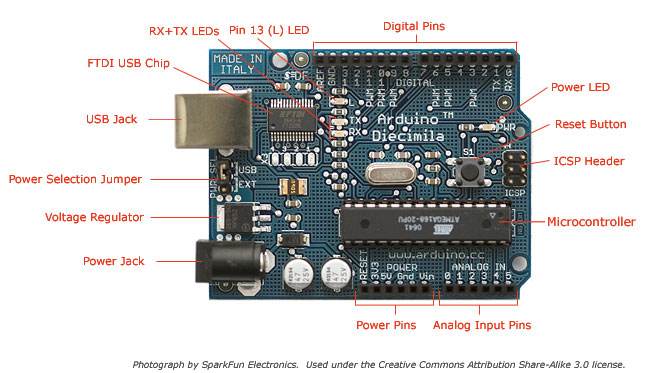
Programming for Arduino is programming a micro-controller which has space and support to hook up electronic inputs and outputs.  In this module, the Arduino will have sensors for sweat levels and heart rate.  Code can be uploaded to the Arduino and is written in C/C++. The software is interchangeable at any time, even without rewiring any hardware. Arduino is the most compatible microcontroller with applications such as sensing sweat levels and heart rate via a pulse sensor.  The language is easy to learn and it’s easy to “do it yourself."
http://arduino.cc


Monday, April 8, 2013

Introduction to Module


 Hypoglycemia comes from low blood sugar or diabetes. Effects of this issue include fainting, seizing, and immobility. These effects are more likely to occur when the patient is sleeping. While sleeping, patient are unable to notice their symptoms.
     The goal of our project is to have a band for humans with diabetes can wear while they sleep. This band detects how high or low their blood pressure  is  their heart rate, and even how low their blood sugar level is. If the band detects that something is irregular, or life threatening, the band will call the nearest hospital, send an ambulance to the person’s location, and even send the hospital a report of the patient’s blood sugar level, blood pressure, heart rate, etc.

Wednesday, April 3, 2013

Introduction to Pulse Co.'s product


Hypoglycemia is an issue that affects the long-term health and well being of those suffering from low blood sugar or diabetes. Many people often suffer from fainting, seizing, or immobility due to their low blood sugar. These occurrences are more commonly known to happen when the patient is sleeping. Hypoglycemia while sleeping leaves the patient unable to notice their symptoms. If left untreated it can lead to seizures and death.
The purpose of the module is to create a wristband that detects hypoglycemia through measurement of heart rate and detection of excess sweating. For now, the module will be intended for use while the patient is sleeping, but in the future it is possible to make this product mobile for use during all hours of the day.
This wristband would help detect when the seizures occur and will sound an alarm to wake the patient and nearby family. The user, or whoever hears the alarm, then has the option to take care of the issue, turning off the alarm, or to call 911. If the alarm is ignored, it will make a call to 911 and the issue will be taken care of from there.
An obstacle faced for this project is the ability to fit all of the code in the machine without overheating or affecting any of the readings. In order to fix this obstacle, the group decided to put an external tower containing most of the hardware where calculations will be done. The wristband will only hold sensors which will transmit information via Bluetooth to this tower. Another obstacle is price. The materials needed for this project will be rather expensive because it involves a tower as well as a smart wristband.
Major tasks include: programming the sensors and connecting the tower to the wristband.The project will require extensive research on hypoglycemia and diabetes and it may also require reading about and learning new programming languages.
At the end of the term, deliverables should include the entire working product - tower, code, and wristband.